AI Scheme of Study Generator for Schools
EduSuite’s AI scheme of study generator takes your syllabus and spreads it across the whole term — week by week, with periods allocated and teaching activities drafted. What took a coordinator days is ready to refine in minutes.

What Is the EduSuite AI Scheme of Study Generator?
A scheme of study (or scheme of work) is the plan that lays your syllabus out across the term — which topics are taught in which week, how many periods each gets, and what the teaching focus is. EduSuite’s AI scheme of study generator builds that plan for you automatically from your committed syllabus.
Instead of a coordinator manually mapping every topic to a week and counting periods, the AI distributes the whole syllabus across the term, allocates periods, and drafts the teaching, practice and activity notes for each block — a complete term plan ready to review.
It’s built for how schools in Pakistan plan: aligned to your board and class, laid out in weeks, with periods that fit your calendar. You keep full control — edit any week, move topics, adjust periods, then submit for approval.
For a head of department, this is the plan that keeps every section on the same page. Instead of each teacher pacing the syllabus differently in their own notebook, the whole subject team works from one approved term plan — so parallel classes cover the same topics in the same weeks, and mid-term assessments actually match what’s been taught.
- Turns your syllabus into a full-term scheme automatically
- Topics distributed week by week across the term
- Periods allocated and balanced for you
- Teaching and activity notes drafted per week
- Fully editable, then submit for approval

Each week: topics, periods and drafted teaching, practice and activity notes.
From Syllabus to Full-Term Scheme in 3 Steps
Your syllabus is already in EduSuite — the AI turns it into a paced, period-allocated term plan.
Set Periods Available
Tell EduSuite how many periods you have for the subject this term, and the scheme paces to fit.
Generate the Scheme
Hit “Generate scheme” and the AI lays your syllabus across weeks, allocating periods and drafting activities.
Refine & Submit
Adjust weeks, move topics, edit activities and add lesson plans — then submit for approval.
A Realistic Term Plan — Not Just a Topic List
The scheme lays your syllabus into weeks, each holding the topics to be covered, the number of periods allocated, and the teaching phase. It even shows how many periods are allocated against how many you have, so you can see at a glance if the term is over- or under-packed.
For every week, the AI drafts three things teachers actually use: the learning focus, the teaching and practice activities, and the assessment approach — all editable. You can also attach lesson plans to any week, connecting the term plan to daily teaching.
- 📅Week-by-Week Layout
Topics grouped into weeks with a clear teaching phase for each block.
- ⏱️Period Allocation
Periods allocated per week and totalled against what you have available.
- 📝Drafted Activities
Learning focus, teaching, practice and assessment notes drafted for every week.
Periods allocated per week, totalled against what you have available.
The Bridge From Syllabus to the Classroom
The scheme of study sits at the heart of EduSuite’s planning chain. It takes the structure from your syllabus and paces it into the term, ready to flow into your timetable and daily lesson plans — one connected plan, built once.
AI Scheme of Study
Spread topics across the term by week.
Everything in the AI Scheme of Study Generator
A complete scheme of work software — from AI term planning to a reusable, board-aligned scheme library.
AI Term Planning
Distribute the whole syllabus across the term automatically from your topics.
Week-by-Week
Topics grouped into weeks with a teaching phase for each block.
Period Allocation
Periods allocated per week and totalled against your available periods.
Activity Drafts
Learning focus, teaching, practice and assessment notes for each week.
Link Topics
Pull topics straight from your syllabus and lay them across the term.
Attach Lesson Plans
Connect lesson plans to any week, linking the term plan to daily teaching.
Draft → Submit
Review and submit the scheme for head-of-department approval.
Scheme Library
Every scheme saved, searchable and reusable across classes and terms.
Board-Aligned
Built from your board-aligned syllabus, for your class and subject.
Every Term Plan, Saved and Ready to Reuse
Each scheme you generate is saved to a searchable library — showing weeks, topics, periods and status at a glance. Draft this term, submit for approval, and duplicate it next year as a starting point instead of planning from scratch.
Coordinators get consistency across sections and years; teachers get a term plan that’s already paced and populated. It’s scheme of study software that turns annual planning from a chore into a repeatable process.
And because the whole library is board-aligned and version-aware, updating for a new session is a matter of duplicating last year’s scheme and adjusting the weeks that changed — not rebuilding the entire term plan from a blank page.
- Searchable library of schemes by title and status
- Weeks, topics and periods shown per scheme
- Draft, submit and duplicate across terms
- Consistent planning across sections and years
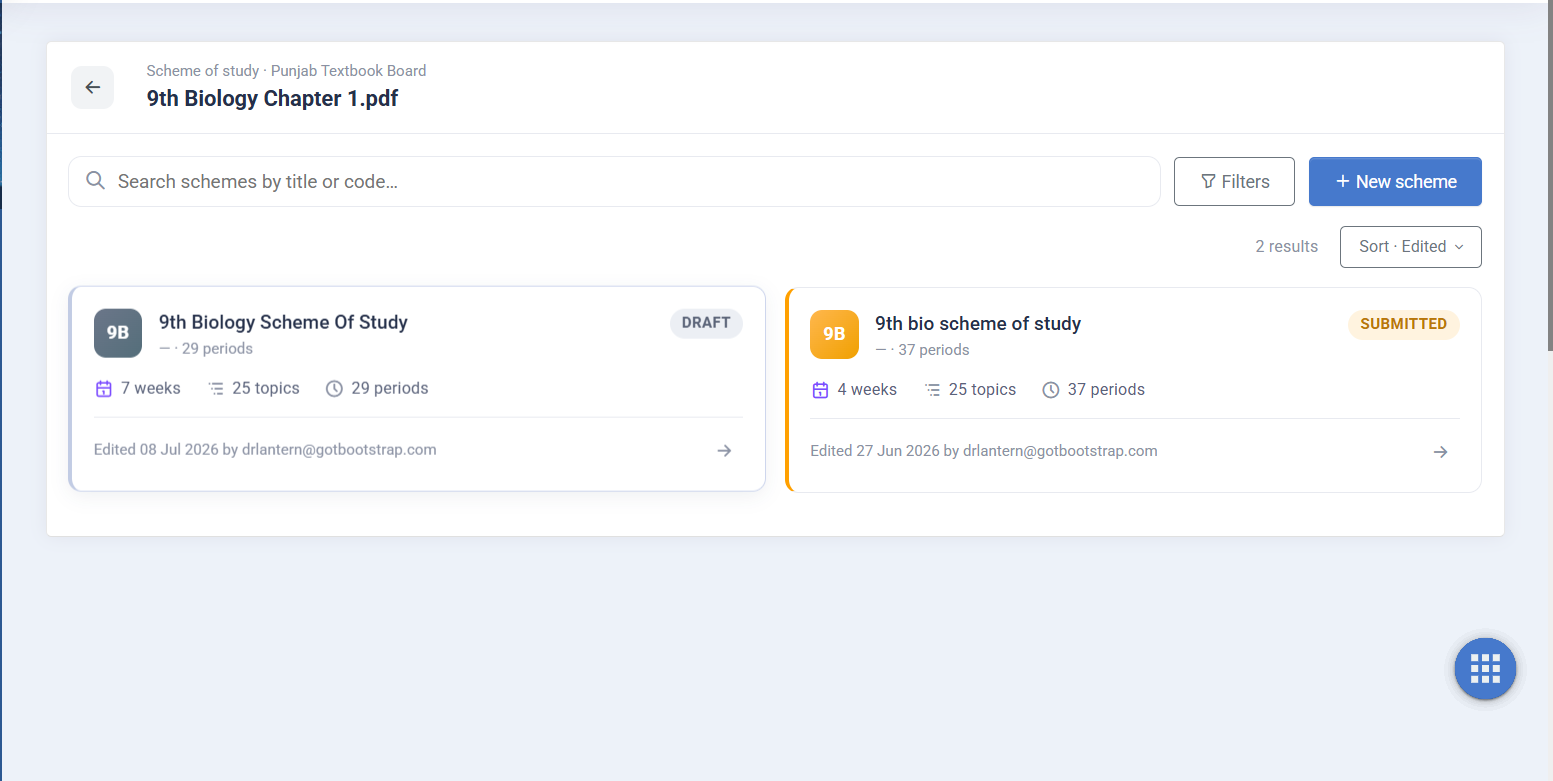
Every scheme saved with weeks, topics and periods — reusable across terms.
A Scheme That Connects to Your Whole School System
A standalone planner leaves you with a document to manage on the side. EduSuite’s AI scheme of study is a module inside a complete school management system, built directly from your AI-generated syllabus.
From there it feeds the timetable and daily lesson plans, and aligns with your academics and exams — so the plan you approve is the plan your teachers actually teach.
That’s the payoff of one connected platform: pace the term once with AI, and the calendar, the daily plans and the reporting all follow from the same source.
- Built from your board-aligned AI syllabus
- Feeds the timetable and daily lesson plans
- Aligned with academics and exam planning
- Cloud-based — plan and reuse from anywhere
Plan Your Whole Term With AI
Book a free demo and watch EduSuite turn your syllabus into a paced, period-allocated scheme of study — then flow it into your timetable and daily lesson plans.
FAQs About the AI Scheme of Study Generator
What is a scheme of study?
A scheme of study (also called a scheme of work) is a term-level plan that lays your syllabus out across the weeks — which topics are taught when, how many periods each gets, and the teaching focus for each block. EduSuite’s AI scheme of study generator builds this automatically from your syllabus.
How does the AI generate the scheme?
You set the number of periods available for the subject, then click “Generate scheme.” The AI distributes your syllabus topics across weeks, allocates periods to each, and drafts the learning focus and teaching, practice and assessment activities — a complete term plan you can then refine.
Can I edit the generated scheme?
Yes. Every week is fully editable — you can move topics between weeks, adjust period counts, rewrite the activity notes, add or remove weeks, and attach lesson plans. The AI drafts it; you finalise it, then submit for approval.
Does it show how many periods I've allocated?
Yes. The scheme totals the periods allocated across all weeks against the number you have available, so you can see at a glance whether the term is balanced, over-packed or has room to spare.
Is it aligned to the Pakistani curriculum?
Yes. The scheme is built from your board-aligned syllabus for a specific class and subject, so it reflects boards like the Punjab Textbook Board and FBISE rather than a generic template.
How does it connect to lesson plans and the timetable?
The scheme of study is step two of EduSuite’s AI planning pipeline. It’s built from your syllabus and feeds the timetable and daily lesson plans, so the term you plan is the term your teachers actually teach.
Can I reuse a scheme next year?
Yes. Every scheme is saved to a searchable library and can be duplicated, so next year you start from a proven plan instead of building from scratch — updating only what’s changed.
Is it part of the EduSuite school system?
Yes. The AI scheme of study generator is a module inside a complete school management system, connected to your syllabus, timetable, lesson plans and academics — so term planning lives in the same platform as everything else.