AI Syllabus Generator for Schools in Pakistan
Upload a board textbook and EduSuite’s AI syllabus generator extracts the full syllabus — every unit and topic — into a clean, structured tree in seconds. Curriculum-aligned, editable, and ready to power your whole academic plan.

What Is the EduSuite AI Syllabus Generator?
The EduSuite AI syllabus generator is a tool that turns a textbook or curriculum PDF into a complete, structured syllabus automatically. Instead of typing out every chapter and topic by hand, you upload the book, and the AI reads it and builds the full unit-and-topic tree for you.
It’s built for how schools in Pakistan actually work: pick the board, class and subject, drop in the prescribed textbook, and get a curriculum-aligned syllabus that matches the book — chapters as units, sub-topics beneath them — in seconds rather than an afternoon of copying.
Every extracted node comes with a confidence score, so you can review, edit any title inline, uncheck anything you don’t want, and commit the syllabus in one click. It’s a syllabus builder that does the heavy lifting while keeping you in control.
For a coordinator or head of department, this is the difference between a lost afternoon and a five-minute task. What used to mean opening the textbook, typing every chapter heading and sub-topic into a spreadsheet, and formatting it by hand becomes a single upload — and because it’s an online syllabus generator inside your school platform, the result is instantly available to every teacher who needs it.
- Extract a full syllabus from any textbook PDF
- Board, class and subject aware from the start
- Units and topics structured automatically
- Confidence score on every node for quick review
- Edit inline, then commit in one click

Pick board, class and subject, then drop in the textbook — the AI does the rest.
From Textbook PDF to Structured Syllabus in 3 Steps
No manual typing, no copy-paste from the book — just upload, review and commit.
Pick Context & Upload
Choose the board, class and subject, then drag in the textbook or curriculum PDF — up to 500 pages.
AI Extracts the Tree
The AI reads the document and builds the full unit-and-topic structure, scoring each node for confidence.
Review & Commit
Edit any title inline, uncheck what you don’t need, and commit the finished syllabus in one click.
Review Every Node Before It Becomes Your Syllabus
The AI doesn’t just dump text — it presents a reviewable tree. Each unit and topic carries a confidence score, and anything below the threshold is flagged for your attention, so you know exactly where to look.
Edit any title inline, untick a node you don’t want, and only commit what you approve. It’s AI speed with human control — the syllabus that lands in your system is the one you signed off, not a black-box guess.
- 🎯Confidence on Every Node
Each extracted unit and topic is scored so low-confidence items are easy to spot.
- ✏️Inline Editing
Rename any title, remove nodes, and fix structure before committing.
- 🔒Private per Tenant
Your uploaded file is processed inside your own tenant — nothing is shared.

Every node is scored and reviewable — commit only what you approve.
Your Syllabus Powers the Whole Academic Plan
The syllabus isn’t the finish line — it’s the foundation. Once committed, it flows straight into EduSuite’s scheme of study, timetable and lesson planning, so you build the structure once and reuse it everywhere.
AI Syllabus
Extract the unit & topic tree from the textbook.
Everything in the EduSuite AI Syllabus Generator
A complete syllabus management tool — from AI extraction to a reusable, board-aligned syllabus library.
PDF Extraction
Turn any textbook or curriculum PDF into a structured syllabus automatically.
Unit & Topic Tree
Chapters become units, sub-topics nest beneath — a clean hierarchy.
Confidence Scoring
Every node scored; low-confidence items flagged for your review.
Inline Editing
Rename, remove or restructure nodes before you commit.
Board Context
Board, class, semester and subject captured for correct alignment.
Syllabus Library
Every syllabus saved, searchable and reusable across classes and terms.
Manual Mode Too
Prefer to build by hand? Create and edit a syllabus manually any time.
Private Processing
Your file is processed in your own tenant — nothing is shared.
Feeds the Pipeline
Flows into scheme of study, timetable and lesson plans with no re-entry.
One Reusable Home for Every Subject’s Syllabus
Every syllabus you generate is saved to a searchable syllabus library — organised by class, subject and board, with units, topics and status at a glance. Draft, publish, duplicate or update as the curriculum changes.
No more hunting through folders for last year’s scheme. Your whole institution works from one consistent, board-aligned set of syllabi that every teacher can build on.
As proper syllabus management software, the library also keeps your curriculum current: when a board updates a textbook, you re-extract the new edition and publish it, and everyone is working from the latest version the same day — no emailing documents around, no version confusion between sections.
- Searchable library by title, code or board
- Units, topics and status shown per syllabus
- Draft, publish and duplicate as needed
- Consistent syllabi across the whole institution
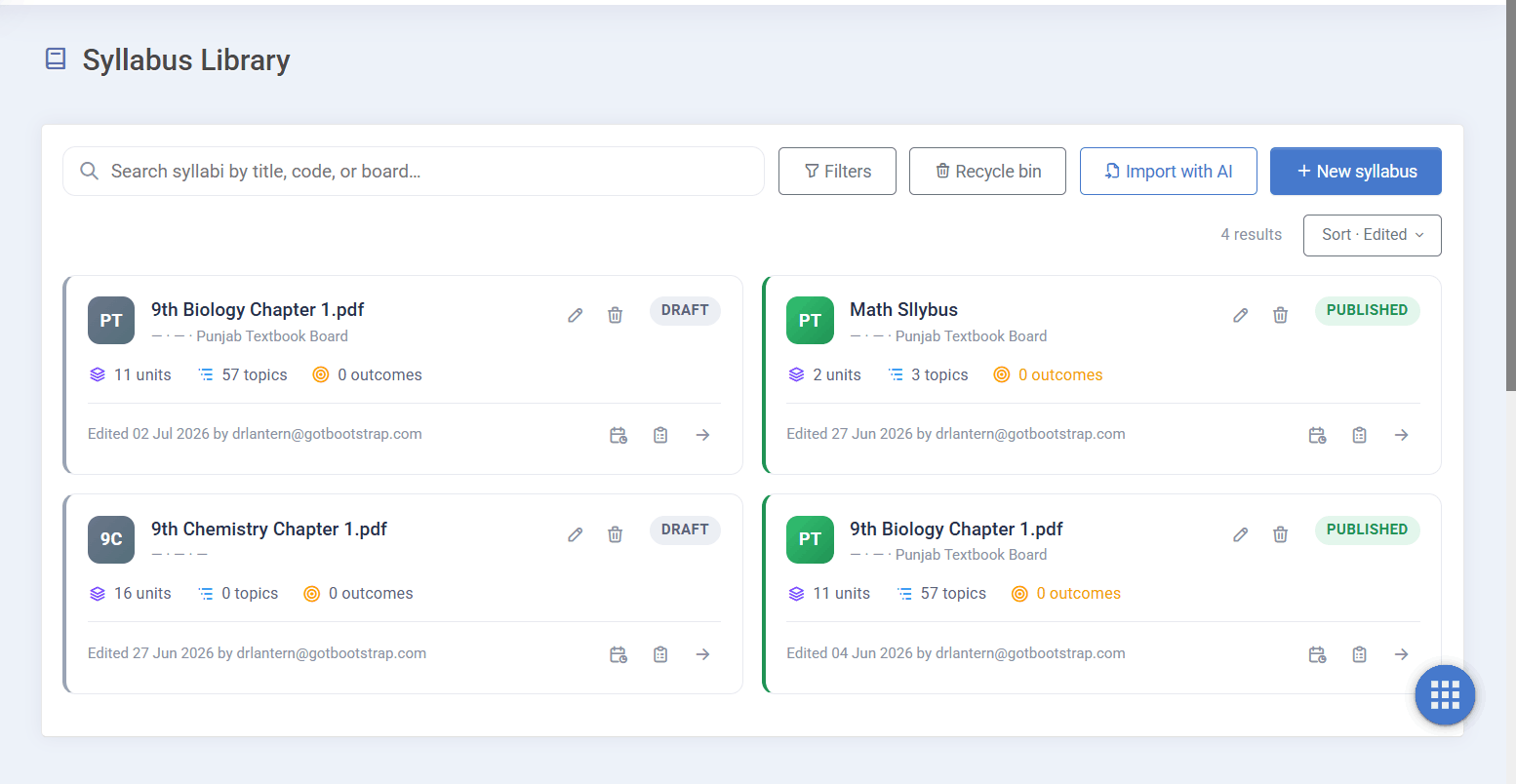
Every generated syllabus, saved and reusable across classes and terms.
More Than a Generator — Built Into Your School System
A standalone syllabus tool gives you a document and stops there. EduSuite’s AI syllabus generator is a module inside a complete school management system, so the syllabus you commit becomes the backbone of your planning.
It feeds directly into the scheme of study, aligns with your academics and exams, and ultimately shapes the daily lesson plans — one connected chain from textbook to classroom.
That’s the difference between software that produces a syllabus and software that runs your academic year. Structure it once with AI, and everything downstream follows.
- Part of a full school management system, not a bolt-on
- Feeds scheme of study, timetable and lesson plans
- Aligned with academics and exam planning
- Cloud-based — build and reuse from anywhere
Build Your Syllabus With AI in Minutes
Book a free demo and watch EduSuite turn a board textbook into a complete, structured, curriculum-aligned syllabus — then flow it into your whole academic plan.
FAQs About the AI Syllabus Generator
What is an AI syllabus generator?
An AI syllabus generator turns a textbook or curriculum document into a complete, structured syllabus automatically. EduSuite’s AI syllabus generator reads an uploaded textbook PDF and extracts every unit and topic into a reviewable tree — scored for confidence — so you get a curriculum-aligned syllabus in seconds instead of typing it by hand.
How does it create a syllabus from a textbook?
You pick the board, class and subject, then upload the textbook or curriculum PDF. The AI reads the document, identifies chapters as units and sub-headings as topics, and builds the full syllabus tree. You then review, edit any title inline, and commit the ones you approve.
Is it aligned to the Pakistani curriculum?
Yes. You set the board, class and subject before extraction, and because the syllabus is built directly from the prescribed textbook, it aligns to boards like the Punjab Textbook Board and FBISE — not a generic foreign template.
Can I edit what the AI extracts?
Yes. Every node comes with a confidence score, and anything below the threshold is flagged for review. You can rename any title inline, uncheck nodes you don’t want, and only commit the structure you approve — AI speed with full human control.
Is my uploaded file kept private?
Yes. Your uploaded textbook or curriculum file is processed inside your own tenant and is not shared. You keep control of your materials while the AI does the extraction.
What happens to the syllabus after I create it?
It’s saved to your searchable syllabus library and becomes the foundation of your planning. It flows directly into the scheme of study, timetable and lesson plans, so you structure it once and reuse it everywhere.
Can I still build a syllabus manually?
Yes. AI extraction is optional — you can create and edit a syllabus manually at any time, or use AI to draft the structure and then refine it by hand.
Is it part of the EduSuite school system?
Yes. The AI syllabus generator is a module inside a complete school management system, connected to academics, scheme of study, timetable and lesson planning — so your syllabus drives the whole academic year rather than sitting in a separate document.