AI Timetable Generator for Schools in Pakistan
Generate a full class timetable in seconds with EduSuite’s AI timetable generator — one that already knows your week patterns, your periods and your official Government of Pakistan holidays. Automatic, board-aligned, and connected to your lesson plans.

What Is the EduSuite AI Timetable Generator?
The EduSuite AI timetable generator is an automatic timetable generator that builds your class schedule for you. Instead of dragging periods around a grid by hand, you pick the class, section and subjects, and the AI generates the whole week — lessons placed, periods filled, ready to review.
What makes it different is that it respects the real rules of your school. It knows your week patterns — which days are full, half or off for each course group — and it reads your academic calendar, so it never schedules class on a holiday or a non-teaching day.
Because it’s built into EduSuite, the generated timetable connects to your lesson plans and the rest of your school system — so the schedule isn’t just a grid, it’s the live plan your classes actually run on.
For an administrator, this is the end of the annual timetable headache. The manual version — juggling teacher availability, half-days and holidays on a whiteboard or spreadsheet for days — becomes a few clicks, and any change later re-flows cleanly instead of forcing a rebuild. It’s timetable software for schools that does the arranging so your team can focus on teaching.
- Generate a whole week across all subjects at once
- Respects full, half and off days per course group
- Reads your calendar — never schedules on a holiday
- Lessons placed straight into the schedule
- Board-aligned and connected to lesson plans
Pick class, section and subjects — generate the whole week in one click.
From Setup to Full Timetable in 3 Steps
Set the rules once, and the AI builds a compliant schedule every time.
Set Patterns & Calendar
Define full, half and off days per course group, and import your official holidays and terms.
Pick Class & Generate
Choose the class, section and subjects, then generate the whole week — all subjects at once.
Review & Adjust
Fine-tune any period, change times, and the lessons are placed and linked to their plans.
Full, Half and Off Days — Per Course Group
Real schools don’t run a flat Monday-to-Friday grid. Primary might have a half-day Friday, Cambridge might be off on Saturday, Matric might teach six days. EduSuite lets you set a week pattern for every course group — click a day to cycle it Full → Half → Off — and the timetable generator obeys it.
That means the AI never schedules a full teaching load on a half day, or any class on an off day. The schedule it produces matches how your school actually operates, group by group, with no manual clean-up afterwards.
- 🟢Full / Half / Off
Set each day per group with a single click — the generator respects it.
- 👥Per Course Group
Primary, Middle, Matric, Cambridge — each can run its own week.
- ⚖️Balanced Load
Teaching load fits the real teaching days, not an idealised week.

A week pattern per course group — Full, Half or Off for every day.
Government Holidays, Imported — Not Typed by Hand
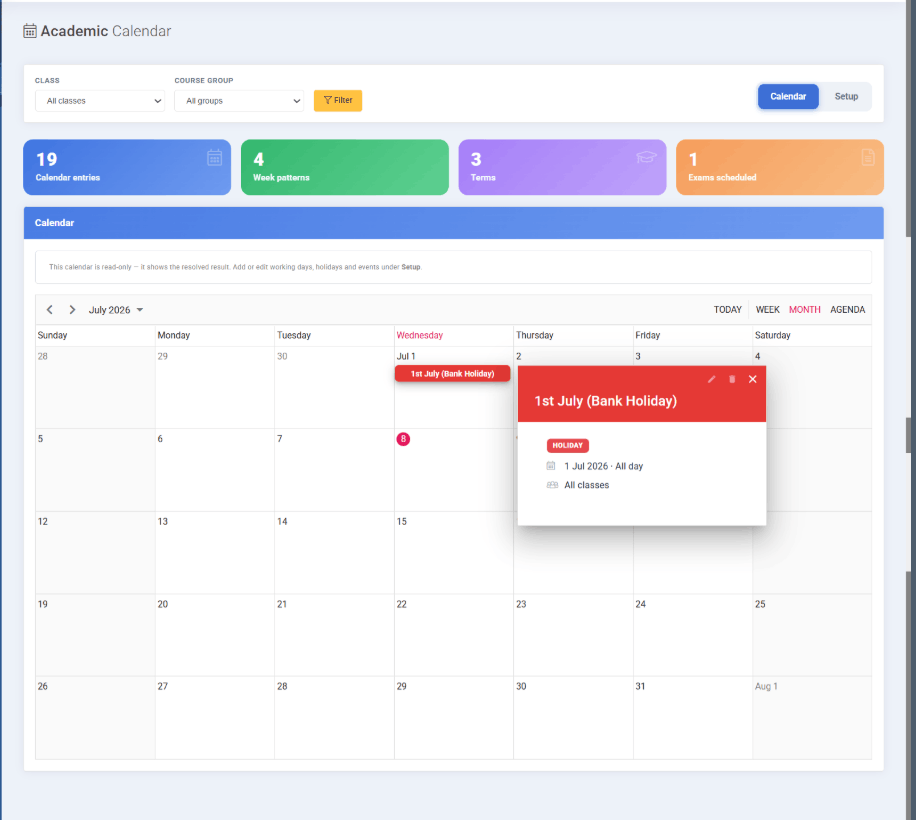
Here’s something no foreign timetable tool does: EduSuite pulls the official Government of Pakistan public-holiday notification straight into your academic calendar. Fetch it automatically, or upload the PDF yourself — each holiday is read directly from the document, with moon-sighting holidays flagged as tentative.
Kashmir Day, Pakistan Day, Eid-ul-Fitr, Labour Day, Eid-ul-Azha, Ashura, Independence Day — all in, correctly dated, before you generate a single period. The timetable then schedules around them automatically, so no class ever lands on a national holiday.
It’s a small feature that saves a real, recurring headache: every year, someone at the school otherwise types the holiday list in by hand and hopes they got the dates right. Here it’s read straight from the official notification — the kind of local detail a generic automatic timetable generator built abroad simply never thinks about.
- Fetch the official Government of Pakistan holiday notification
- Or upload the PDF — holidays read straight from it
- Moon-sighting holidays flagged as tentative
- Timetable schedules around them automatically

Official Pakistan public holidays — fetched from the government notification.
Where Your Plan Meets the Calendar
The timetable is where the whole plan comes together. It takes the pacing from your scheme of study and drops real lessons into a real calendar — respecting your week patterns and holidays — ready for the daily lesson plans to slot straight in.
AI Timetable
Place lessons into a real calendar.
Everything in the AI Timetable Generator
A complete school timetable software — from automatic generation to a calendar that knows your rules.
Auto Generation
Generate a whole week across all subjects, or a single subject’s week.
Week Patterns
Full, half and off days set per course group and always respected.
Official Holidays
Government of Pakistan holidays imported into your calendar.
Terms & Exams
Academic terms and scheduled exams reflected in the calendar.
Lessons Placed
Lesson plans dropped straight into their periods, ready to teach.
Day / Week / Month
View the schedule by day, week, work-week or month.
Easy Adjustments
Change any period or time; the schedule updates cleanly.
Class & Section
Generate per class and section, for the subjects you choose.
Connected
Built from your scheme of study, linked to lesson plans and academics.
A Timetable That’s Part of Your Whole School System
A standalone timetable maker gives you a grid and nothing more. EduSuite’s AI timetable generator is a module inside a complete school management system, built from your scheme of study and connected to the rest of your school.
Lessons in the timetable link to their lesson plans, the calendar aligns with your academics and exams, and the whole schedule respects the holidays and week patterns you set once. Everyone sees the same, correct timetable.
That’s the advantage of one connected platform: set your rules once, generate the schedule, and it stays consistent with your plans, your calendar and your classroom — automatically.
- Built from your AI scheme of study
- Lessons linked to their lesson plans
- Calendar aligned with academics and exams
- Cloud-based — one timetable everyone can see
Generate Your Timetable in Seconds
Book a free demo and watch EduSuite build a full class timetable that respects your week patterns and official Pakistan holidays — with lessons placed and ready to teach.
FAQs About the AI Timetable Generator
What is an AI timetable generator?
An AI timetable generator automatically builds a class schedule instead of you arranging periods by hand. EduSuite’s AI timetable generator lets you pick a class, section and subjects and generates the whole week — placing lessons into periods while respecting your week patterns and holidays.
Can it generate a timetable for the whole week?
Yes. You can generate a whole week across all subjects in one click, or generate a single subject’s week if you prefer. The AI fills the teaching days and leaves off days and holidays empty.
Does it handle half days and off days?
Yes. You set a week pattern for each course group — clicking a day to cycle it Full, Half or Off — and the generator always respects it. Primary, Middle, Matric and Cambridge groups can each run their own week.
Does it know Pakistani public holidays?
Yes, and this is a real differentiator. EduSuite imports the official Government of Pakistan public-holiday notification directly into your academic calendar — fetched automatically or uploaded as a PDF — with moon-sighting holidays flagged as tentative. The timetable then schedules around them automatically.
Can I adjust the generated timetable?
Yes. The generated schedule is fully editable — change any period, adjust times, and move things around. You can view it by day, week, work-week or month, and the lessons stay linked to their plans.
How does it connect to lesson plans?
The timetable is step three of EduSuite’s AI planning pipeline. It’s built from your scheme of study, and each scheduled lesson links to its lesson plan — so the timetable isn’t just a grid, it’s the live plan classes run on.
Is it suitable for schools and colleges in Pakistan?
Yes. It’s built for Pakistani institutions — aligned to your board and class, aware of local week patterns and public holidays, and available as part of the cloud-based EduSuite platform from any browser.
Is it part of the EduSuite school system?
Yes. The AI timetable generator is a module inside a complete school management system, connected to your syllabus, scheme of study, lesson plans and academics — so one set of rules keeps everything consistent.